

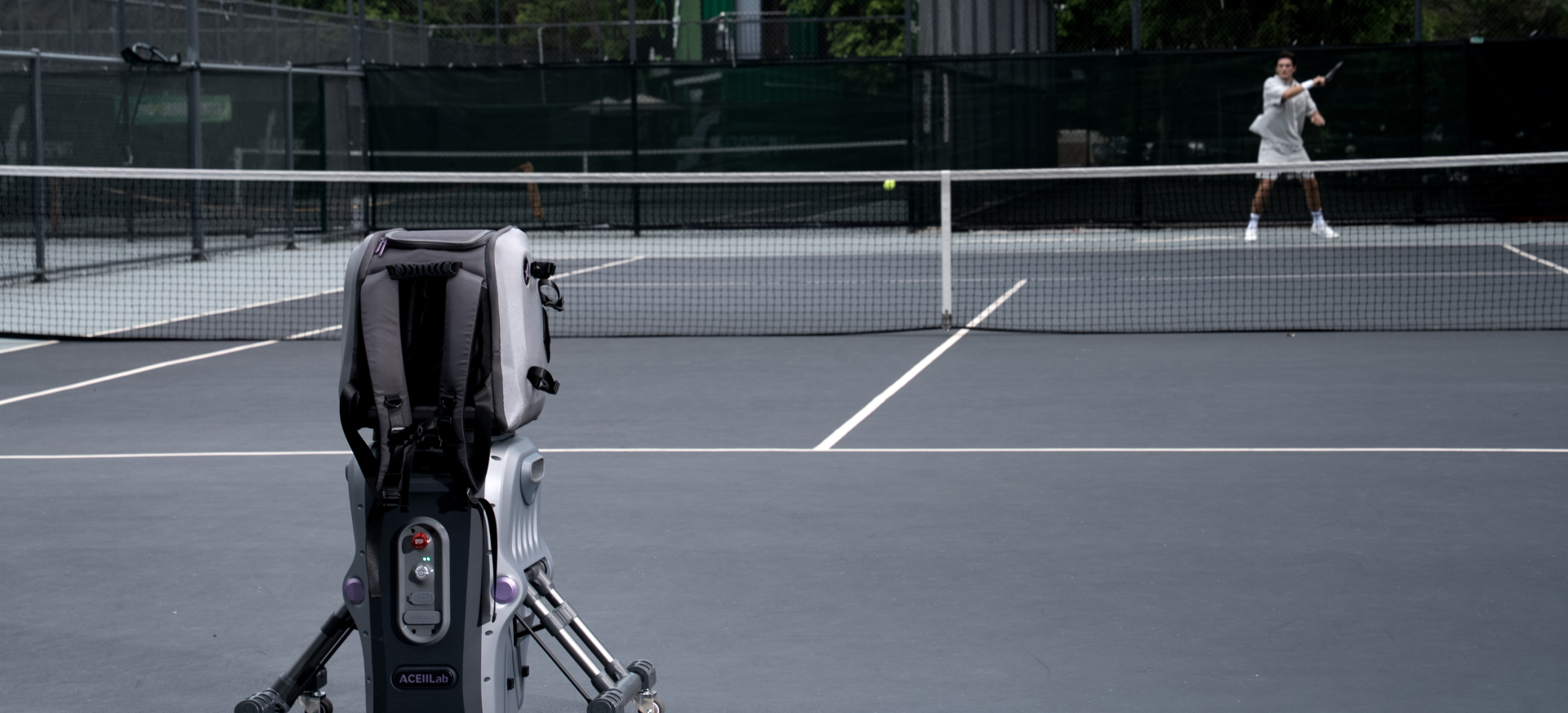
What is ACEii ONE?
ACEii ONE is an AI-powered tennis training robot designed to move, see, and rally more like a real training partner. It combines AI vision, autonomous movement, ball launch, app control, training modes, and training feedback into one intelligent system.
Is ACEii ONE the same as a traditional tennis ball machine?
No. A traditional ball machine mainly feeds repeated balls from a fixed position. ACEii ONE is designed to add movement, court awareness, rally logic, app-based training, and software-supported feedback.
Why do you call ACEii an AI tennis robot instead of a ball machine?
Because the core value is not only launching balls. ACEii is designed around a full training experience: seeing the court, moving into position, supporting rally practice, structuring drills, and helping players review progress.
What does human-like rally mean?
It means ACEii aims to create a more natural rally rhythm than repeated fixed feeds. It can combine movement, timing, route, spin, speed, height, and app logic to make solo practice feel closer to playing with a partner.
What are the main advantages of ACEii ONE?
The major advantages are AI vision, autonomous movement, customizable training, preset drills, app control, removable battery, ball bag design, and a training ecosystem that can expand through software updates.
What problem is ACEii trying to solve?
ACEii is built for players who want high-quality practice without always depending on a hitting partner, coach, or fixed training schedule.
What comes in the box?
The package includes the ACEii ONE tennis robot, ball bag, removable battery, adapter charging cable, and product manual. Final package contents should follow the official order page and user manual.
How many balls can ACEii hold?
ACEii ONE supports up to 120 tennis balls, helping users train longer with fewer interruptions.
Why should I choose ACEii instead of a regular tennis ball machine?
Choose ACEii if you want more than repeated feeding. ACEii is designed to support movement-based training, AI vision, app control, preset and custom drills, and a more realistic solo rally experience.
Why is ACEii more expensive than normal ball machines?
The price reflects a more complete system: AI vision, autonomous movement, training logic, app software, removable battery design, ball bag structure, and hardware designed for real court use. It is positioned as a next-generation training robot, not a basic feeder.
I already own a ball machine. Do I still need ACEii?
If your current machine only feeds from one fixed position, ACEii offers a different experience: movement, vision-based interaction, rally logic, custom drills, and app-connected training.
Is ACEii worth it if I only play once or twice a week?
If your main problem is finding consistent practice time or a reliable hitting partner, ACEii can still be valuable. It helps you make limited court time more structured and repeatable.
Can ACEii replace a tennis partner?
ACEii does not replace human match play, but it helps solve the no hitting partner problem by providing consistent practice and more partner-like rally scenarios.
Can ACEii replace a coach?
ACEii cannot fully replace a human coach, but it can support training with guided drills, feedback, reports, and future coaching features through software updates.
What should I check before buying?
Check your court access, storage space, shipping region, warranty terms, app compatibility, training goals, and whether you need advanced solo training rather than simple ball feeding.
Is ACEii suitable for beginners?
Yes. Beginners can start with lower speed, simpler placement, quick rally, and preset drills. They do not need to build complex custom programs at the beginning.
Is ACEii suitable for intermediate players?
Yes. Intermediate players can use preset drills, rally modes, movement patterns, and custom training to improve consistency, footwork, and reaction speed.
Is ACEii suitable for advanced players?
Yes. Advanced players can increase speed, spin, interval intensity, route variation, and training difficulty to create more demanding sessions.
Is ACEii suitable for kids?
Yes, but children should use ACEii under adult supervision. Start with lower speeds, wider intervals, and simple drills.
Can coaches use ACEii in lessons?
Yes. Coaches can use ACEii to reduce repetitive feeding workload, create consistent drills, and focus more attention on player technique and feedback.
Can tennis clubs or academies use ACEii?
Yes. Clubs and academies can use ACEii for warm-ups, repeatable drills, technical practice, footwork training, junior programs, challenge sessions, and member training experiences.
Is ACEii hard to set up?
The basic setup is designed to be straightforward: place the robot on the baseline, install the ball bag, load balls, install the battery, power it on, unfold the support legs, connect the app, and choose a mode.
Where should I place ACEii on the court?
Place ACEii at the center of the baseline with the front side facing the court. Make sure the robot is positioned straight toward the court before training.
Does ACEii need court calibration?
Yes. ACEii uses initialization to recognize the court baseline. The robot can move along the baseline and use its line-tracking camera to identify the court line before training.
Do I need to unfold the support legs?
Yes. The support legs should be unfolded before training to improve stability. Make sure there are no obstacles around the robot before unfolding them.
Can I move ACEii by myself?
ACEii is designed with portability in mind, including a side handle, pull handle, ball bag, removable battery, and wheels. Move it carefully and avoid unsuitable surfaces.
What should I check before starting training?
Check battery level, ball bag installation, ball loading, support legs, court space, app connection, surrounding obstacles, and whether the robot has completed initialization.
What does ACEii’s AI vision actually do?
ACEii’s AI vision helps the robot understand court lines, players, balls, rackets, gestures, and training scenarios. This supports movement, rally logic, feedback, and training interaction.
Is AI vision just a camera?
No. The vision system is designed to support recognition and decision-making, not only recording video. The goal is to move from simply seeing to understanding training situations.
Does ACEii need wearable sensors?
No. ACEii is designed as a vision-based system, so players do not need to wear extra sensors for basic recognition and training interaction.
What can ACEii recognize?
ACEii is designed to recognize the player, tennis ball, racket, gestures, court lines, and training space. Feature availability may depend on software version and enabled functions.
Can ACEii recognize gestures?
Yes. ACEii is designed to support contactless gesture interaction, making it easier to start or control training while staying on court.
Does lighting affect AI vision?
Good lighting helps vision-based recognition. For best results, use ACEii in normal court lighting conditions and avoid extremely dark, reflective, or visually blocked environments.
Can ACEii move on court?
Yes. ACEii uses autonomous movement to reposition during training, creating a more realistic experience than fixed-position feeding.
Why does movement matter?
Movement allows ACEii to simulate a more realistic opponent. Instead of always feeding from the same position, it can move to different positions and create more dynamic training scenarios.
Does ACEii move randomly?
No. ACEii is designed to move based on training logic, selected mode, court positioning, and app settings.
Does movement make training more realistic?
Yes. Real opponents move before hitting. ACEii’s movement helps create a more natural rhythm, timing, placement change, and pressure.
Will ACEii fall over while moving?
ACEii is designed with support legs and a stable structure, but users should always use it on a suitable court surface and make sure the support legs are deployed before training.
What is Fast Return?
Fast Return is designed for a faster rhythm. When enabled, the robot returns balls more quickly. When disabled, it can move to the landing point before returning, creating a more realistic rally rhythm.
Which mode should I start with?
If you are new to ACEii, start with Quick Rally or an easier preset training mode. Choose a lower difficulty first, then increase speed, spin, and placement complexity over time.
What is Rally Mode?
Rally Mode is designed for solo rally practice. ACEii helps create a more natural training rhythm so players can practice as if they had a partner on court.
What is Quick Rally?
Quick Rally is a simple way to start training. Choose a difficulty level and begin playing without building a complex drill.
What is AI Adaptive Rally?
AI Adaptive Rally is designed to match training difficulty to your receiving ability, making practice feel more responsive and suitable for your current level.
What is Preset Training?
Preset Training gives you ready-made training categories and difficulty levels, so you can start structured practice quickly without setting every parameter manually.
What training categories are included in Preset Training?
Preset Training can include baseline skills, net skills, combination and movement, free training, serve and return, and other structured training scenarios depending on software version.
What is Battle Mode?
Battle Mode is designed for competitive-style training, helping solo practice feel closer to match pressure or competition with technical models.
What is Challenge Mode?
Challenge Mode is designed as guided, goal-based training. It helps users complete training tasks and progress through levels.
What is Ranking Mode?
Ranking Mode adds level ranking and competition elements, making training more motivating and measurable.
Can I customize my own drill?
Yes. ACEii allows users to create custom training based on specific parameters, training goals, and playing level.
What parameters can I customize?
You can customize route, ball speed, spin, ball height, interval, ball count, tracking range, training groups, and drill structure depending on the mode and app version.
Can I build multiple drills in one session?
Yes. ACEii is designed to support custom training flows, so users can build a more complete session instead of only one single drill.
Can I customize preset modes?
Yes. Preset modes can be used as a starting point, and users can adjust training details to better match their own level and goals.
Can I save my custom settings?
ACEii’s app-based system is designed to support training records and parameter-based training. Availability may depend on the app version.
Can I download training parameter packs?
Yes. The community ecosystem is designed to support parameter packs shared by other users, allowing you to download training ideas and use them for your own practice.
Do I have to use the app?
Yes. The app is important for setup, device binding, mode selection, training control, custom settings, and software-supported features.
Where can I download the Aceii Lab app?
Download the Aceii Lab app from the App Store or Android app store, depending on your phone and region.
Can I control ACEii from my phone?
Yes. You can use the app to select modes, adjust settings, customize drills, manage training sessions, and view supported records or feedback.
Why can’t my app find the robot?
Make sure the robot is powered on, your phone is near the robot, Bluetooth or connection permissions are enabled, and you are using the correct Aceii Lab app.
Can I start training without walking back to the robot?
Yes. ACEii is designed to reduce unnecessary interruptions through app control and supported contactless interactions such as gesture or watch-based control depending on availability.
Will ACEii receive software updates?
ACEii is designed as a software-connected training platform, so future improvements can be released through app and software updates.
How long does the battery last?
Battery life depends on training mode. Static feeding can last up to around 8 hours, while dynamic rally training can last up to around 2 hours.
Why does dynamic rally use more battery?
Dynamic rally requires movement, repositioning, launch, vision processing, and control logic, so it consumes more power than static feeding.
Is the battery removable?
Yes. ACEii uses a removable battery design, making charging, replacement, and longer training sessions more convenient.
How do I install the battery?
Align the angled parts correctly, insert the battery in the shown direction, and press it firmly until the lock is secured.
How do I remove the battery?
Press both battery locks at the same time to release the battery, then pull it out in the indicated direction.
How do I check the battery level?
The robot has battery indicator lights. The light status helps show different battery ranges so you know whether to charge before training.
What type of court can ACEii be used on?
ACEii is designed for tennis court training. It is best used on flat, clean, and open court surfaces.
Can ACEii be used indoors?
Yes, if the indoor court has enough space and the surface is suitable for safe movement and ball feeding.
Can ACEii be used in the rain?
We do not recommend using ACEii in rain, on wet courts, or in conditions where water may enter the robot. Store it in a dry place after use.
Can ACEii be used on a crowded court?
No. Keep the training area clear. ACEii needs space to move safely, and players should make sure no people, pets, or objects are in the movement or ball path.
Is ACEii safe when it moves?
ACEii is designed with movement and obstacle-related hardware. Still, users should always keep the surrounding area clear before training and follow the manual.
Can children use ACEii?
Children should use ACEii under adult supervision. Start with lower difficulty, lower speed, and simple drills.
What kind of tennis balls should I use?
Use standard tennis balls in good condition. Avoid damaged, wet, heavily worn, or deformed balls because they may affect feeding consistency.
How many balls should I load?
ACEii supports up to 120 balls, but you can load fewer balls for shorter sessions.
What should I do if balls do not feed smoothly?
Check whether the ball bag is installed correctly, balls are loaded properly, and no damaged or wet balls are blocking the feed path.
Can ACEii feed topspin and slice?
ACEii is designed to support different ball outputs such as topspin, backspin, flat balls, and slice-style training depending on mode settings.
Can ACEii launch lobs?
Yes. ACEii supports adjustable launch angle and height-based training depending on mode.
How do I maintain ACEii after training?
Turn off the machine, remove remaining balls, check for debris, clean the exterior with a dry soft cloth, and store it in a dry place.
Can I wash ACEii with water?
No. Do not wash the robot with water. Use a dry or slightly damp cloth for exterior cleaning and avoid water entering the machine.
Should I clean the wheels?
Yes. Check the wheels regularly and remove dust, clay, sand, or debris that may affect movement.
Should I clean the cameras?
Yes. Keep the camera area clean so the vision system can work properly. Use a soft cloth and avoid scratching the lens area.
ACEii does not power on. What should I do?
Check whether the battery is installed correctly, whether it has enough charge, and whether the power button is pressed correctly.
The app cannot connect. What should I do?
Check app permissions, phone connection settings, battery level, robot power status, distance from the robot, and whether you are using the correct Aceii Lab app.
The robot does not move. What should I check?
Check whether initialization is complete, the support legs are unfolded, the surrounding area is clear, and the selected mode requires movement.
The robot does not feed balls. What should I check?
Check ball loading, ball bag installation, ball condition, selected mode, feed path, and whether the machine is paused or waiting for initialization.
The training feels too difficult. What should I do?
Lower the difficulty, reduce ball speed, increase feed interval, simplify placement, or switch to beginner-friendly preset training.
The training feels too easy. What should I do?
Increase speed, spin, placement variation, interval intensity, difficulty level, or use more advanced custom drills.
The robot stops during training. What should I check?
Check battery level, app status, obstacle conditions, mode settings, emergency stop, and whether the robot entered a safety or pause state.
The ball placement feels inconsistent. What should I check?
Use good-quality balls, confirm court setup, complete initialization, and check whether the selected mode uses random or variable placement.
When will my order ship?
Shipping time depends on order date, delivery country, inventory status, and pre-order schedule. Customers should check their order confirmation and official shipping updates.
Do you ship internationally?
International shipping availability depends on destination country or region. Check checkout availability or contact support before ordering.
Will I receive a tracking number?
Yes. Once the order ships, tracking information should be sent to the email used for the order.
Does ACEii include a warranty?
Warranty coverage depends on region, sales channel, and official purchase terms. Keep your order confirmation and product information.
What does the warranty cover?
Warranty usually covers manufacturing defects under normal use. Damage caused by misuse, improper setup, accidents, water exposure, unauthorized repair, or modification may not be covered.
How do I request warranty support?
Contact support with your order number, device information, issue description, photos, videos, and app screenshots if available.
Can I return ACEii ONE?
Return eligibility depends on purchase region, return window, product condition, packaging, and official return policy.
What condition is required for return?
Returned products generally need to be in like-new condition with original packaging, accessories, manuals, and included items.
Are used or damaged products returnable?
Products damaged by misuse, improper setup, water exposure, unauthorized modification, or missing parts may not be eligible for return.
Should I keep the original packaging?
Yes. Keep the original packaging during the return and warranty period because it protects the robot during shipping.
How can I get help faster?
Send clear information: order number, product photo, short video of the issue, app screenshots, battery level, and steps already tried.
What should I do before contacting support?
Check the FAQ, user manual, battery, app connection, ball loading, initialization, and court setup. Then send evidence if the problem remains.
What information helps support solve the problem faster?
Order number, purchase channel, product photos, short videos of the issue, app screenshots, battery status, and a clear description of what happened.
Where can I contact support?
Use the official support email, website contact form, or app support channel once published. Always include order and device details.